TradingView Bots for Automated Crypto Trading.
Connect TradingView alerts and Pine Script logic to configurable trade execution with Cornix.
4.7on Google Play and the App Store14-day free trial
Start trading in 3 simple steps.
- 01
Create an account
Create a Cornix account and connect your exchange
- 02
Set up your bot
Create a TradingView bot and connect it to your alerts/pine scripts
- 03
Track
Track your bots’ performance over time
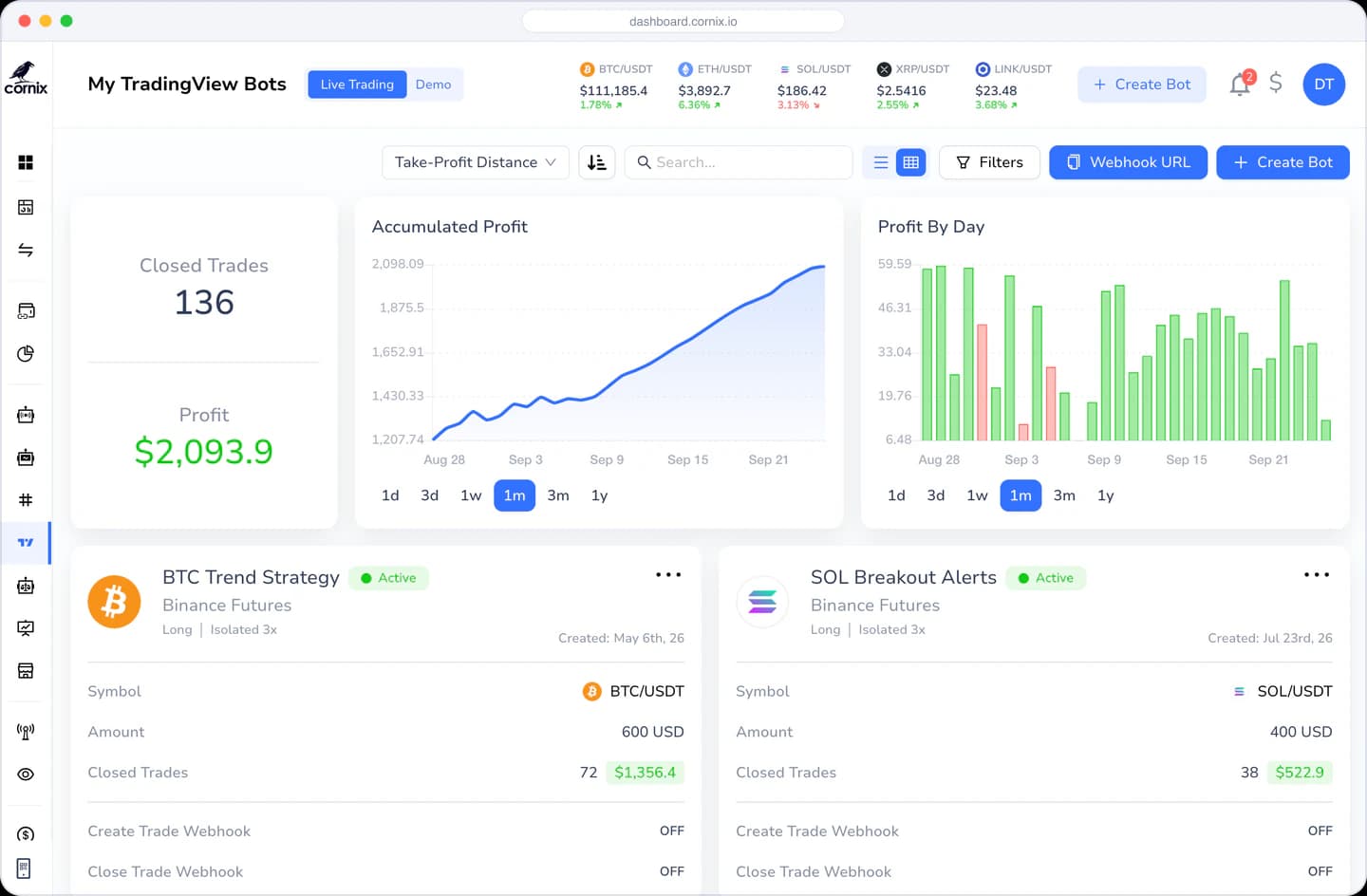
Connect TradingView alerts to Cornix automation
Use TradingView to detect your strategy conditions, then apply Cornix settings for entries, position sizing, take-profit, stop-loss, and other supported execution controls.
Use your own alerts and Pine Scripts
Connect alerts built from your own indicators or a script you have reviewed. Test the complete alert-to-order workflow and keep monitoring it after activation.
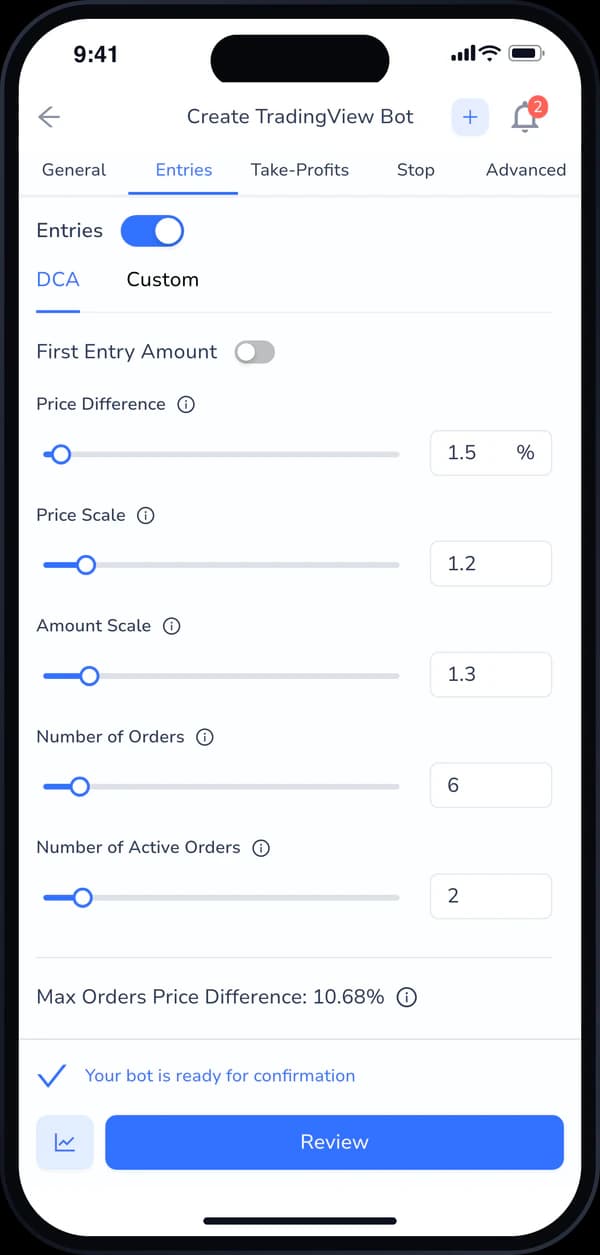
Configure entries, take-profit, and stop orders
- Multiple concurrent orders
- Conditional targets
- Trailing configurations
- Advanced settings for mitigating risk and scheduling trading
Simplified Complexity
Why use TradingView bots.
Apply configurable execution and risk controls
Highly customized with advanced trading features
Enjoy the best of both worlds
Save time by letting the bots do the work for you
Keep emotion out of the equation
Safe and secure platform with 24/7 support
From alert to controlled execution
Design a TradingView bot you can test and monitor
TradingView can detect a condition and send an alert; Cornix can apply your configured execution rules. Reliable automation starts with unambiguous alert logic, deliberate order settings, and a process for testing failures as well as successful signals.
- 01
Make alerts deterministic
Use clear conditions and messages that map to the intended action. Test duplicate, delayed, missing, and out-of-sequence alerts so the strategy has defined behavior when conditions are imperfect.
- 02
Configure the complete order
Set entries, position sizing, take-profit, stop-loss, and trailing behavior in advance. Confirm how the bot should respond when a position already exists or an order cannot be filled.
- 03
Test before scaling
Validate the Pine Script or alert, connection, bot settings, and exchange behavior with controlled exposure. Monitor both TradingView alert history and Cornix execution records.
Before activating a TradingView bot
- 1Confirm the alert condition is stable and does not repaint unexpectedly.
- 2Send test alerts and verify that every message maps to the correct bot action.
- 3Review order sizing and exit behavior for both long and short scenarios where applicable.
- 4Document how to pause the workflow if alerts or exchange connectivity behave unexpectedly.
Frequently asked questions.
How does a Cornix TradingView bot work?
TradingView detects the condition defined by your alert or Pine Script, then Cornix applies the configured account, order, position-sizing, take-profit, stop-loss, and other supported execution settings.
Can Cornix automate Pine Script alerts?
Yes. A TradingView bot can act on alerts created from Pine Script or other TradingView conditions after the alert message and Cornix bot are configured and tested together.
How should I test a TradingView bot?
Send controlled test alerts and confirm the intended symbol, direction, amount, entries, exits, and duplicate-alert behavior before increasing exposure. Monitor both TradingView alert history and Cornix execution records.
Loved by traders
Thousands of crypto traders trust Cornix.
Our goal is your success. We do our best to make the Cornix experience simple and reliable, so you stay with us for years to come.
Great Trading view bot and support
“This bot have got very cool support and trading view bot systems I have used the trading view alert to take trades directly with my broker it is very fast and Sharp it execute trades at the exact trade price with no delay....”
I was interested to try DCA bots
“I wasn't sure that it will work, but I checked reviews and read the info on the website, and decided to try and figure out is it really good or no? And now I am really glad to see my results and everything was easy to set up, thanks.”
Best crypto trading platform i've tried
“I like their platform, works great on my iPhone so it's always there and their web is great for when I need to see more at one. Super recommend.”
The best auto trading bot for crypto
“The best auto trading bot for crypto. I have been using it for a year now and I don't want to change it for any other. Clear. Easy. Powerful. And the documentation and help service is great and fast. 10/10”
Cornix is the one and only BOT you need
“Cornix is the one and only BOT you need for trading crypto! Awesome tool to manual trade and automatically follow signals.”
Cornix is Awesome
“Cornix is excellent and support is great. Cornix is now my default trading platform. I can no longer go back to trading manually. Well done Cornix.”
Signal Provider onboarding XP: GREAT
“The onboarding as signal provider has been great with Ben and Cornix Team help and guidance. They are always happy to serve and help actively to achieve my main strategy goals and configuration.”